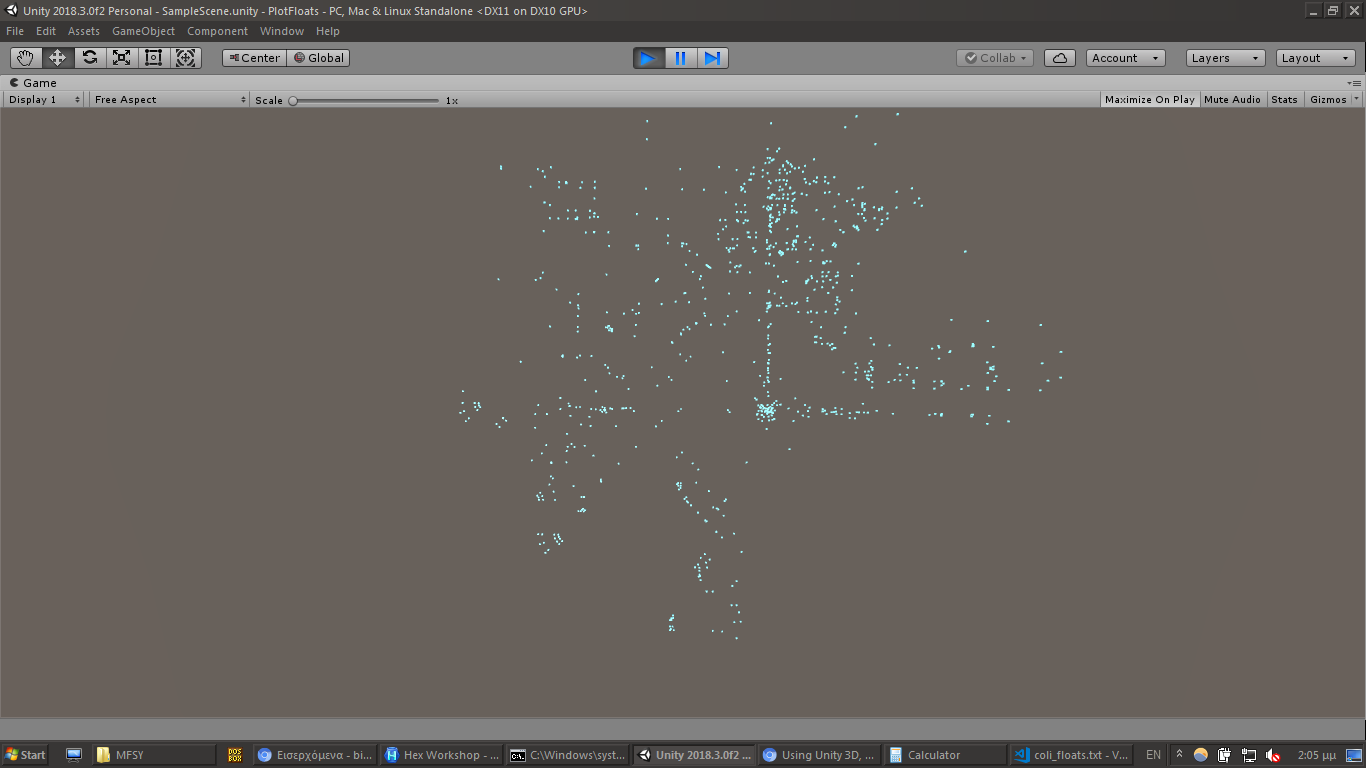
Using Unity 3D, it takes a text file where each line contains a float value. It reads the float values in pairs; the first value is considered the X coordinate and the second the Z coordinate, and so on. For each of these pairs, it instanciates a prefab (a sphere), with its position based on these coordinates, in order to plot all the points onto a scene.
The text file is generated using a Ruby script (coli2floats.rb), which takes a binary file of raw COLI data.
The raw COLI data is extracted from a MAPINFO.BIN by hand (using a hex editor). Specifically, you find COLS in the .BIN,
and you copy the first COLI section, but only the bytes (that is, without the string COLI and without
the next 4 bytes after COLI; these 4 bytes is the size of the COLI section, and this section starts
after these 4 bytes).
By inspecting the results, it is obvious that you are looking to the boundaries (collision data) of the map.
Run this script with ruby coli2floats.rb input_file.bin. The input_file.bin is the data that you copied
from the MAPINFO.BIN (as described above).
coli2floats.rb
def error_and_exit(error_message)
  print error_message
  exit
end

argv_size = ARGV.size
((argv_size > 1) and
error_and_exit("Expected 1 argument (found #{argv_size}).")) or
((argv_size == 0) and
error_and_exit("Expected 1 argument, found 0."))

filename = ARGV[0]
bytes = IO.binread(filename)
word_size = 4
lines_last_index = bytes.size/word_size - 1 # fist index is 0

new_line_str    = "\n"
pack_command    = "c*"
unpack_command  = "e"

output_file = File.open("coli_floats.txt", "w+")

index = 0
bytes.each_byte.each_slice(word_size) { |word|
  index += 1

  first_3_bytes_sum = word[3] + word[2] + word[1]
  word_sum          = first_3_bytes_sum + word[0]

  ((first_3_bytes_sum == 0) or
  (word_sum == 1020)) and
  next
  # Exclude words from [00 00 00 01] to [00 00 00 ff],
  # and words equal to [ff ff ff ff].

  output_file.print word.pack(pack_command).unpack(unpack_command)[0]

  (index < lines_last_index) and output_file.print new_line_str
}

output_file.close
In the following C# script, the asset is the text file generated by the above Ruby script,
and the prefab is a prefab like a sphere or a cube. You have to add this C# script as a
Component to an empty gameObject, and add that gameObject onto a Scene. Then Run to see the result.
PlotColiData.cs
using System;
using System.IO;
using System.Collections;
using System.Collections.Generic;
using UnityEngine;

public class PlotColiData : MonoBehaviour
{
  [SerializeField]
  TextAsset asset;
  [SerializeField]
  GameObject prefab;

  void Start()
  {
    string[] lines = asset.text.Split('\n');
    List<float> values = new List<float>();

    foreach (string line in lines)
    {
      float value = float.Parse(line,
      System.Globalization.CultureInfo.InvariantCulture.NumberFormat);

      values.Add(value);
    }

    Quaternion rotation = new Quaternion(1, 1, 1, 1);
    for (int i = 0; i < values.Count; i += 2)
    {
      Vector3 position    = new Vector3(values[i], 1, values[i+1]);
      GameObject obj      = Instantiate(prefab,
                                        position, rotation) as GameObject;
    }
  }
}
This was generated from the "0000" COLI of COLS of MAPINFO.BIN of JU00 (Yamanose area) on Disc 1:

This was generated from the "0000" COLI of COLS of MAPINFO.BIN of D000 (Dobuita area) on Disc 1:

This was generated from the "0000" COLI of COLS of MAPINFO.BIN of MFSY (Harbor area) on Disc 3: