Jit (short for Journal-IT) is a developer productivity tool that automatically generates a detailed journal of your GitHub activity — including commits, pull requests, and issues — using the power of the Gemini API and the GitHub API.
With a single click, developers can turn their daily contributions into structured, insightful journal entries — and publish them as a personal webpage using GitHub Pages.
Generate your Journal here - Jit
-
🔐 Seamless GitHub Login
No account creation needed — just authenticate with GitHub. -
🧠 Intelligent Prompt Construction
Efficiently fetches and summarizes GitHub activity (commits, PRs, issues) into < 100K tokens using custom prompt-building logic. -
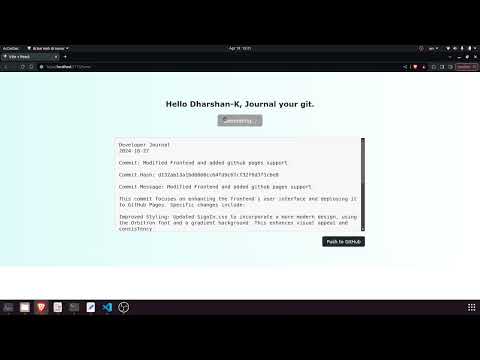
📄 Auto-generated Journal Entries
Converts contributions into readable, Markdown-based developer journals. -
🌐 One-click Deployment
Automatically creates a GitHub repository, pushes the journal, and deploys it to GitHub Pages. -
🗃️ Persistent Entry Tracking
Maintains a JSON-based record of all journal entries. -
⚙️ Powered by:
- FastAPI for backend services
- GitHub API for retrieving user contribution data
- Gemini API for summarizing and interpreting event data
- HTML/CSS/JavaScript for rendering the journal and frontend interactivity
- GitHub OAuth: Authenticates users and fetches their public contribution data.
- Prompt Constructor: Efficiently extracts and structures GitHub event data (commits, diffs, PRs, issues).
- Gemini Summarizer: Sends constructed prompts to the Gemini API and receives back formatted journal content.
- HTML Generator: Converts journal content into a standalone HTML page.
- Auto-deploy: Creates a repository, commits the journal, and deploys it using GitHub Pages.
- Data Persistence: Saves journal metadata in a structured JSON file for historical tracking.
- Backend: FastAPI (Python)
- AI Integration: Gemini API (LLM prompt-based summarization)
- Frontend: HTML, CSS, JavaScript
- APIs: GitHub OAuth & GitHub Events API
- Deployment: GitHub Pages
  Clone the repo

  To run the Frontend
  npm run dev

  To run the Backend
uvicorn app:app --reload- Maintain a personal developer journal effortlessly.
- Showcase daily coding activity and progress in a readable format.
- Generate an auto-updating developer portfolio using only your GitHub activity.
- Add support for private repo journaling.
- GitHub Actions-based automatic daily updates.
- Multiple output formats (PDF/Markdown).
- Analytics dashboard for tracking contributions over time.
- Custom prompt tuning for different journal styles (technical, narrative, concise).
[Dharshan]
Software Engineer | Developer Productivity Enthusiast
LinkedIn | GitHub