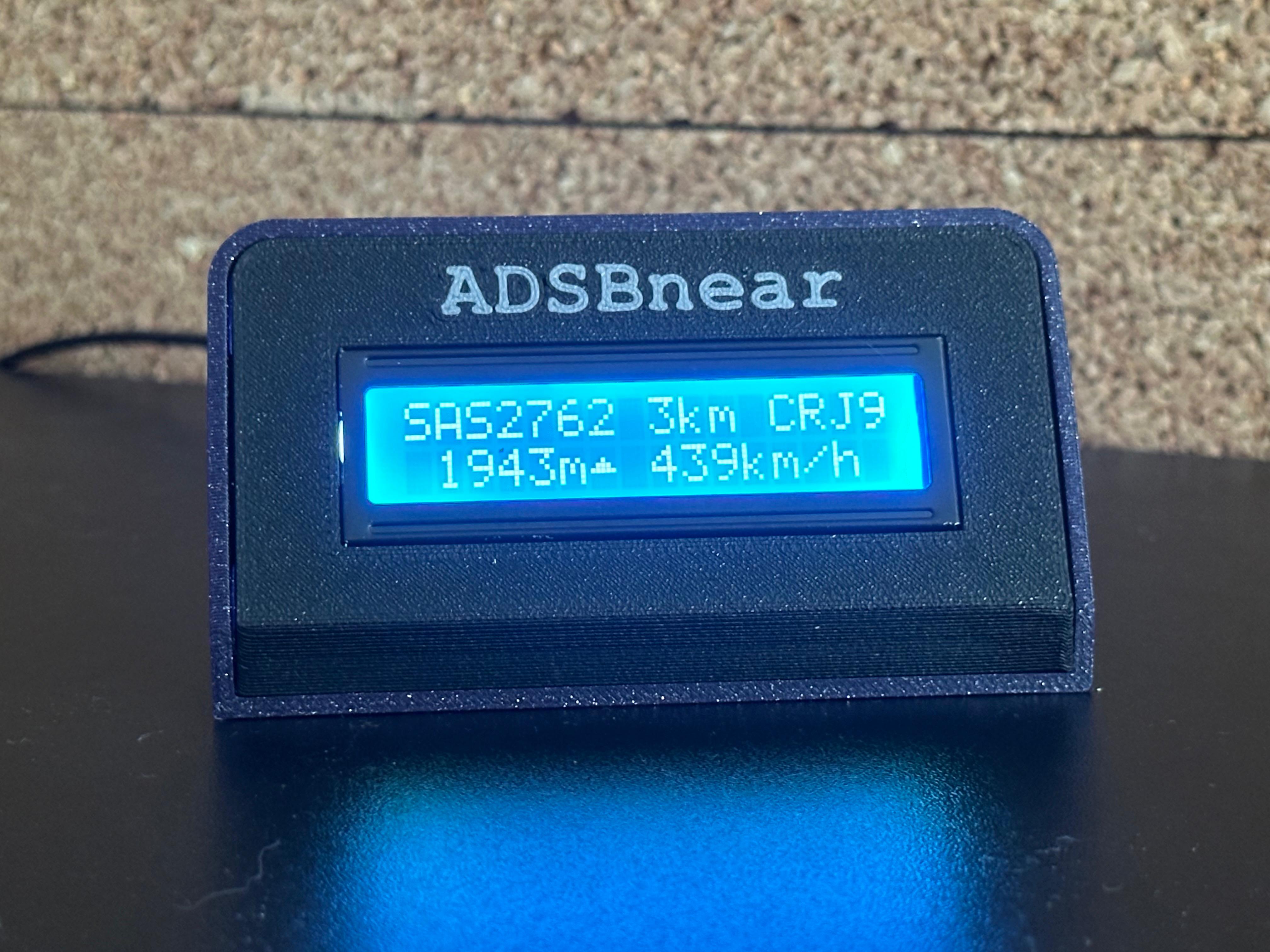
A CircuitPython project that displays the nearest aircraft on a 16×2 LCD screen using real-time ADS-B data. Perfect for aviation enthusiasts who want to know what's flying overhead without checking their phone 24/7.
ADSBnear transforms your microcontroller into a live aircraft tracker. It can pull data from the adsb.lol API via Wi-Fi or from a local ADS-B receiver (dump1090, readsb, tar1090) on your network. Watch as planes appear and disappear from your personal radar scope, displaying the closest aircraft's vital information on a compact LCD with intelligent polling that adapts to air traffic activity.
- Microcontroller: CircuitPython-compatible board (Raspberry Pi Pico W, ESP32-S3, etc.)
- Display: 16×2 LCD with I2C backpack (PCF8574)
- Connection: Wi-Fi capability
- Power: USB power supply
This project was inspired by u/fil1983's "Nearest Aircraft Display" on Reddit. Their original implementation features a beautiful large OLED display with advanced features.
ADSBnear is a simplified, budget-friendly alternative using a basic 16×2 LCD (with about 1/3 of the features of the original setup) for those who want core aircraft tracking functionality without the complexity or price.
Flash your microcontroller with the latest CircuitPython firmware
CIRCUITPY/
├── main.py              # Main program file
├── lib/                 # Required libraries folder
└── plane_types.json     # Optional: Aircraft database
Edit the configuration section at the top of main.py:
# Data source: "api" for adsb.lol, "local" for a local ADS-B receiver
DATA_SOURCE = "api"

# API settings (used when DATA_SOURCE = "api")
API_RADIUS_KM = 7       # Search radius for API calls

# Local receiver settings (used when DATA_SOURCE = "local")
# Common URLs:
#   tar1090 / readsb:  http://<ip>/tar1090/data/aircraft.json
#   dump1090-fa:        http://<ip>/dump1090-fa/data/aircraft.json
#   dump1090 (default): http://<ip>:8080/data/aircraft.json
LOCAL_ADSB_URL = "http://192.168.1.100/tar1090/data/aircraft.json"

# Network Configuration
WIFI_SSID = "your_wifi_name"
WIFI_PASSWORD = "your_wifi_password"

# Location (get coordinates from Google Maps)
LATITUDE  = 52.16517  # Your latitude
LONGITUDE = 20.96894  # Your longitude

# Display Settings
DISPLAY_RADIUS_KM = 10 # Maximum distance to display

# Smart Polling Configuration
POLL_SEC = 4.0         # seconds between polls when a plane is displayed
NO_PLANE_POLL_SEC = 30.0 # seconds between polls when no plane is displayed
ERROR_POLL_SEC = 5.0   # seconds to wait on error before retrying

# Hardware Settings
LCD_I2C_ADDRESS = 0x27 # I2C address of LCD backpackCopy the included lib/ folder to your CircuitPython device. Required libraries:
- LCD display library (credit: Dan Halbert)
- Standard CircuitPython networking libraries
Copy plane_types.json for detailed aircraft names in console output (e.g., "Boeing 737 MAX 8" instead of "B38M").
Note: This only affects serial console output due to 16×2 display limitations.
- Power on your device
- Connect - Device automatically connects to Wi-Fi
- Scan - Begins searching for nearby aircraft
- Display - Shows closest aircraft within range
- Smart Updates - Polls every 4 seconds when aircraft present, every 30 seconds when skies are empty
- No Wi-Fi connection: Check SSID/password, ensure 2.4GHz network
- Blank LCD: Verify I2C address (try 0x3F if 0x27 doesn't work)
- No aircraft data (API mode): Check internet connection and API availability
- No aircraft data (local mode): Verify
LOCAL_ADSB_URLis reachable — try opening it in a browser to confirm JSON is returned - Wrong distance/aircraft: Verify latitude/longitude coordinates
Use this code snippet to scan for your LCD's I2C address:
import board
import busio
i2c = busio.I2C(board.SCL, board.SDA)
print([hex(x) for x in i2c.scan()])| Setting | Default | Description |
|---|---|---|
DATA_SOURCE |
"api" |
"api" for adsb.lol, "local" for local receiver |
API_RADIUS_KM |
7 | How far to search for aircraft (API mode) |
LOCAL_ADSB_URL |
"http://..." |
URL of local receiver JSON endpoint |
LOCAL_AC_MSG_RATE |
False |
Show per-aircraft msg/s instead of speed (local mode only) |
ALTERNATE_ROUTE |
False |
Alternate line 1 between callsign and route |
ROUTE_CALLSIGN_SEC |
2.0 |
Seconds to show callsign before switching to route |
ROUTE_DISPLAY_SEC |
2.0 |
Seconds to show route before next fetch |
DISPLAY_RADIUS_KM |
10 | Maximum distance to display |
POLL_SEC |
4.0 | Update frequency when plane displayed |
NO_PLANE_POLL_SEC |
30.0 | Update frequency when no planes |
ERROR_POLL_SEC |
5.0 | Retry delay after errors |
LCD_I2C_ADDRESS |
0x27 | I2C address of LCD backpack |
PLANE_TYPES_FILE |
"/plane_types.json" | Aircraft database file path |
- Fixed
ALTERNATE_ROUTEtiming: callsign and route durations are now controlled byROUTE_CALLSIGN_SECandROUTE_DISPLAY_SEC, fully independent of the poll interval (old code tied route display time toPOLL_SECwhich could collapse to near-zero) - Fixed layout shift when alternating: distance and aircraft type are now pinned at fixed column positions regardless of label length — a 6-char callsign and 7-char route no longer cause the rest of the row to move
- Route lookup now works with local feeders: when
ALTERNATE_ROUTE = Trueand route data isn't in the aircraft JSON, the callsign is looked up via adsbdb.com (free, no key required). Results are cached per callsign so the API is only hit once per flight. SSL is automatically loaded when needed
- Added
ALTERNATE_ROUTEconfig option: when enabled, line 1 alternates every 2 seconds between the callsign (e.g.SAS2945) and the route (e.g.WAW-CDG). Works with any data source that provides route or origin/destination fields. Falls back to callsign-only if no route data is present
- Added
LOCAL_AC_MSG_RATEconfig option: in local mode, replaces the speed field on the aircraft display line with the per-aircraft message rate (e.g.2.4msg/s) received from that specific transponder
- In local mode, the idle screen now shows live feeder message rate (e.g.
2.4msg/s) instead of uptime when no aircraft are in range
- Added local ADS-B receiver support (dump1090, readsb, tar1090) — set
DATA_SOURCE = "local"and pointLOCAL_ADSB_URLat your receiver - SSL is only loaded when using API mode, saving memory in local mode
- Fixed altitude trend arrow logic (climb/descend arrows now work correctly)
- Added real bearing calculation in console output
- General code cleanup
Added debug info. Change DEBUG_INFO = False to True in the config to enable
Added arrow indicators after altitude numbers to show if planes are climbing ▲ or descending ▼
Initial release
- Inspiration: u/fil1983 - Original advanced aircraft display
- LCD Library: Dan Halbert - CircuitPython LCD library
- Data Source: adsb.lol - Real-time ADS-B API