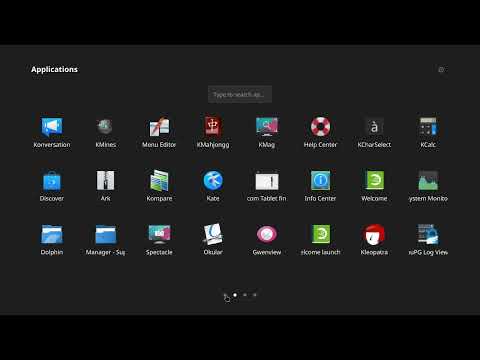
A macOS-style fullscreen application launcher for Linux, supporting both X11 and Wayland sessions.



| Video | Screenshots |
|---|---|
 |
 |
 |
 |
 |
 |
- Full-screen grid of application icons
- Drag-and-drop folder grouping
- Drag-and-drop reordering
- Multi-page navigation with page indicator dots
- Integrated search — apps, files, and web
- Settings panel
- Live reload — detects new/removed applications automatically
- Works on X11 and Wayland
- Works on any desktop environment or window manager (even the tilling ones)
- Keyboard navigation and launch
- Python 3.11 or newer
- PyQt6 >= 6.4
- watchdog >= 3.0
The requirements are automatically handled by the installers.
Download the latest linxpad-VERSION-linux.tar.gz from the Releases page, extract it, and run the installer:
tar -xzf linxpad-1.0.0-linux.tar.gz
cd linxpad-1.0.0-linux
./install
The installer detects your distribution, installs any missing dependencies, and sets up the application and desktop entry automatically. Pass --non-interactive to skip all prompts.
| Format | Distros |
|---|---|
| RPM | Fedora 42, 43 · openSUSE Tumbleweed |
| DEB | Debian 12, 13 · Ubuntu 22.04, 24.04, 25.04 |
| Arch | PKGBUILD manual |
| AppImage | Any Linux Distro (x86_64) |
| Flatpak | Any Linux Distro with Flatpak installed |
Download the appropriate package from the Releases page and install with your package manager.
git clone https://github.com/apapamarkou/linxpad.git
cd linxpad
./install
Or install in editable mode for development:
make installLaunch from your application menu, or run from the terminal:
linxpad| Key | Action |
|---|---|
Esc |
Close launcher |
| Arrows | Navigate in pages, folders and search results |
PgUp / PgDn |
Navigate pages |
| Type anything | Open search |
Settings are stored in ~/.config/linxpad/:
| File | Purpose |
|---|---|
settings.conf |
Settings panel data |
apps.json |
Application order, folder assignments |
Contributions are welcome. Please open an issue before submitting a pull request for significant changes.
See docs/developer-usage.md for how to set up a development environment.
LinxPad is released under the GNU General Public License v3.0 or later.