





Open security scanner for AI supply chain and infrastructure — agents, MCP servers, packages, containers, cloud (AWS, Azure, GCP, Snowflake, Databricks, CoreWeave, Nebius), GPU, and runtime.
Every CVE in your AI stack is a credential leak waiting to happen. agent-bom follows the chain end-to-end and tells you exactly which fix collapses it.

CVE-2025-1234  (CRITICAL · CVSS 9.8 · CISA KEV)
  |── better-sqlite3@9.0.0  (npm)
       |── sqlite-mcp  (MCP Server · unverified · root)
            |── Cursor IDE  (Agent · 4 servers · 12 tools)
            |── ANTHROPIC_KEY, DB_URL, AWS_SECRET  (Credentials exposed)
            |── query_db, read_file, write_file, run_shell  (Tools at risk)

 Fix: upgrade better-sqlite3 → 11.7.0
Blast radius is the core idea: CVE -> package -> MCP server -> agent -> credentials -> tools. CWE-aware impact keeps a DoS from being reported like credential compromise.
agent-bom agents --demo --offlineThe demo uses a curated sample so the output stays reproducible across releases. Every CVE shown is a real OSV/GHSA match against a genuinely vulnerable package version — no fabricated findings (locked in by tests/test_demo_inventory_accuracy.py). For a real scan, run agent-bom agents, or add -p . to fold project manifests and lockfiles into the same result.
Want an inspectable sample before scanning your own repo? Run the bundled first-run AI stack:
agent-bom samples first-run
agent-bom agents --inventory agent-bom-first-run/inventory.json -p agent-bom-first-run --enrich
That sample includes agent inventory, MCP server definitions, placeholder
credential environment variable names, Python/npm manifests, and a prompt file.
See docs/FIRST_RUN.md for the guided path from CLI to
dashboard.

pip install agent-bom                  # CLI
# pipx install agent-bom               # isolated global install
# uvx agent-bom --help                 # ephemeral run

agent-bom agents                              # discover + scan local AI agents and MCP servers
agent-bom agents -p .                         # add project lockfiles + manifests
agent-bom samples first-run                   # write an inspectable sample AI stack
agent-bom check flask@2.0.0 --ecosystem pypi  # pre-install CVE gate
agent-bom image nginx:latest                  # container image scan
agent-bom iac Dockerfile k8s/ infra/main.tf   # IaC scan, optionally `--k8s-live`
Recommended pilot on one workstation:
curl -fsSL https://raw.githubusercontent.com/msaad00/agent-bom/main/deploy/docker-compose.pilot.yml -o docker-compose.pilot.yml
docker compose -f docker-compose.pilot.yml up -d
# Dashboard -> http://localhost:3000
Recommended full self-hosted path in your own AWS / EKS:
export AWS_REGION="<your-aws-region>"
scripts/deploy/install-eks-reference.sh \
  --cluster-name corp-ai \
  --region "$AWS_REGION" \
  --hostname agent-bom.internal.example.com \
  --enable-gateway
Advanced/manual path from a checked-out repo:
helm upgrade --install agent-bom deploy/helm/agent-bom \
  --namespace agent-bom --create-namespace \
  -f deploy/helm/agent-bom/examples/eks-production-values.yaml
After the first scan:
agent-bom agents -p . --remediate remediation.md                  # fix-first plan
agent-bom agents -p . --compliance-export fedramp -o evidence.zip # tamper-evident evidence bundle
pip install 'agent-bom[ui]' && agent-bom serve                    # API + bundled local UI
Product views — dashboard, remediation, and graph surfaces
These come from the live product path, using the built-in demo data pushed through the API. See docs/CAPTURE.md for the canonical capture protocol.
They are captured from the packaged Next.js dashboard served by agent-bom serve, not from the Snowflake Streamlit compatibility path.
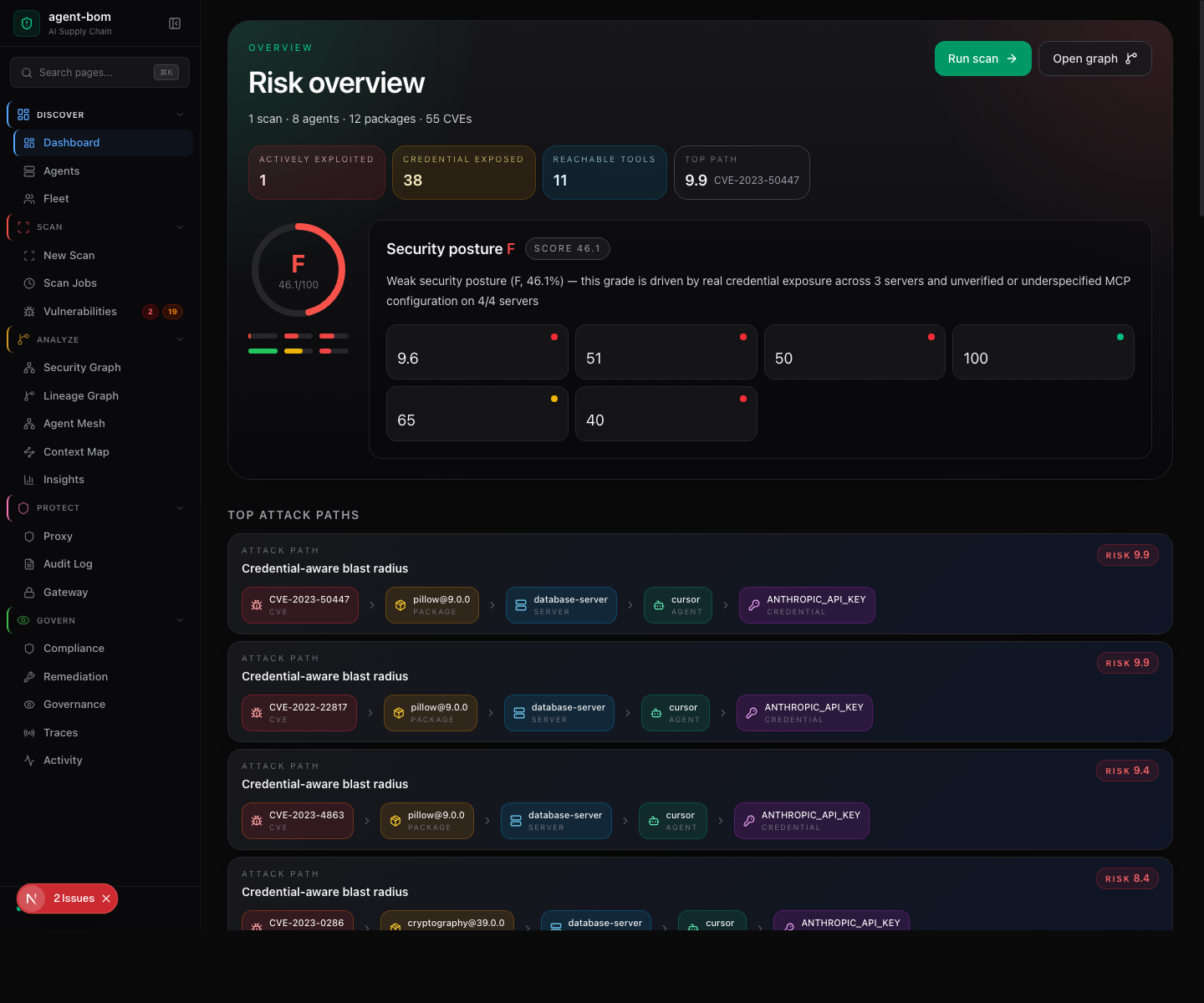
The landing page is the Risk overview: a letter-grade gauge, the four headline counters (actively exploited · credentials exposed · reachable tools · top attack-path risk), the security-posture grade with sub-scores (policy + controls, open evidence, packages + CVEs, reach + exposure, MCP configuration), and the score breakdown for each driver.
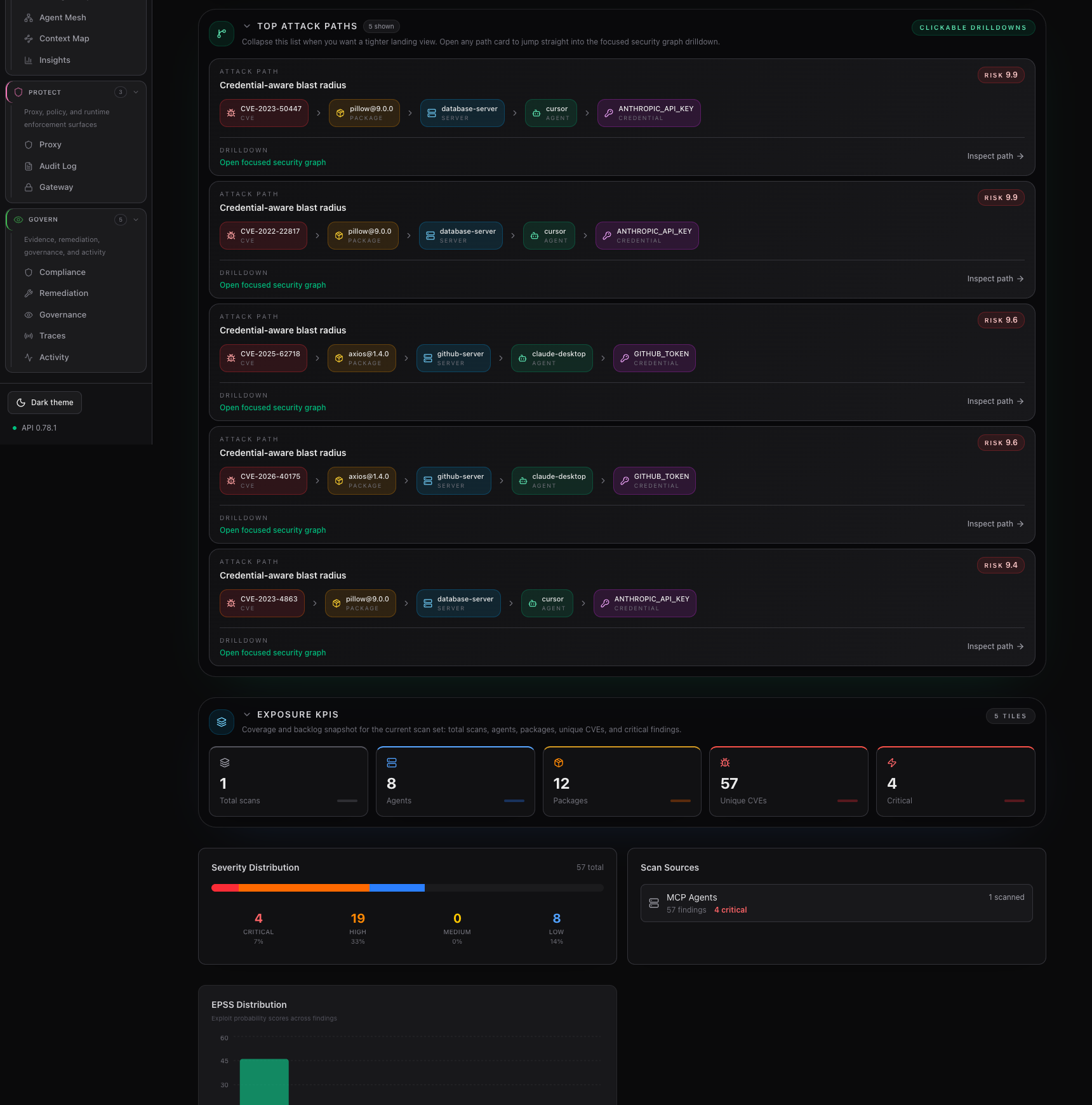
The second dashboard frame focuses on the fix-first path list and the coverage / backlog KPIs below it, so the attack-path drilldown stays readable without a tall stitched screenshot.
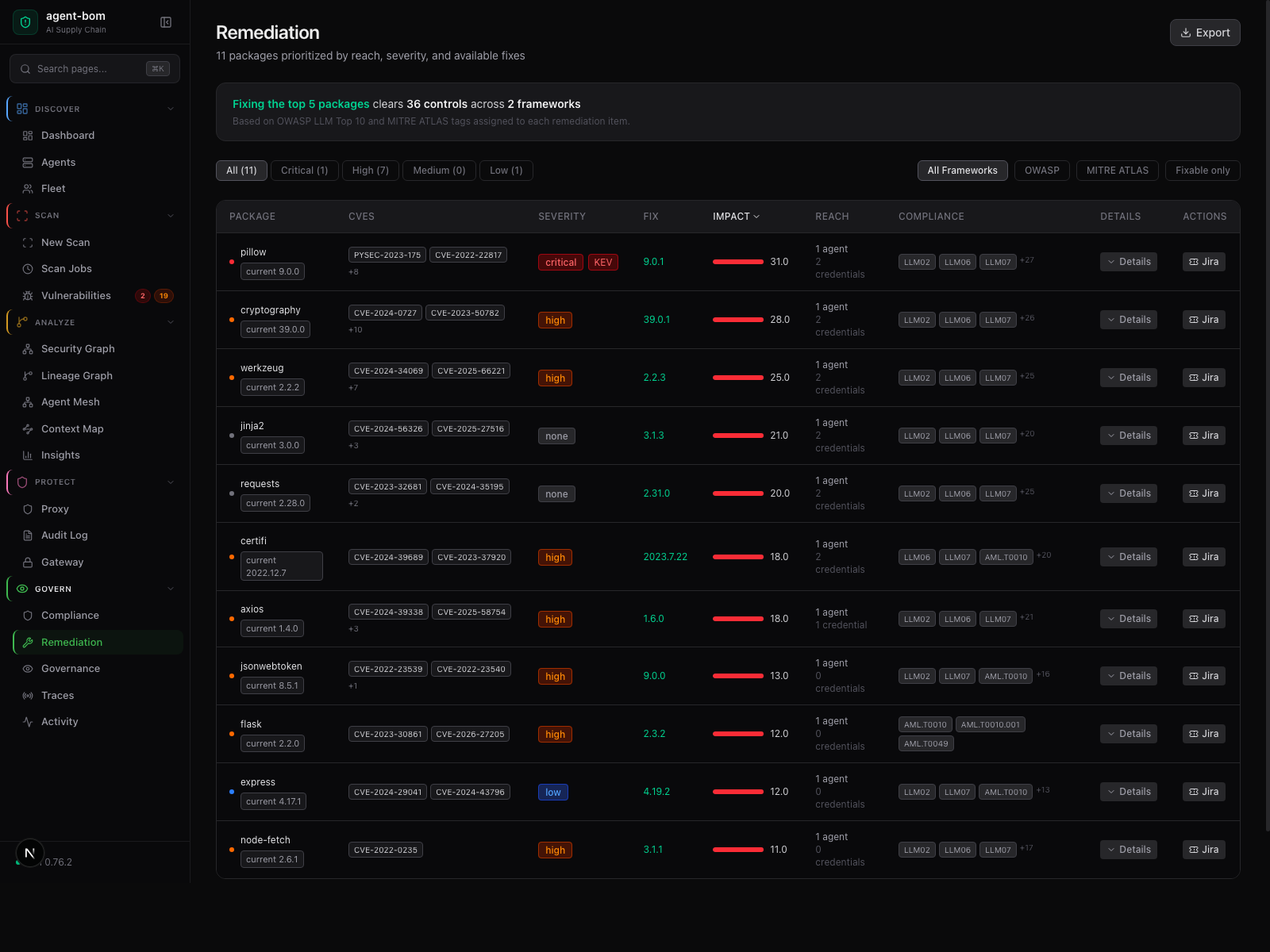
Risk, reach, fix version, and framework context in one review table — operators act without jumping between pages.
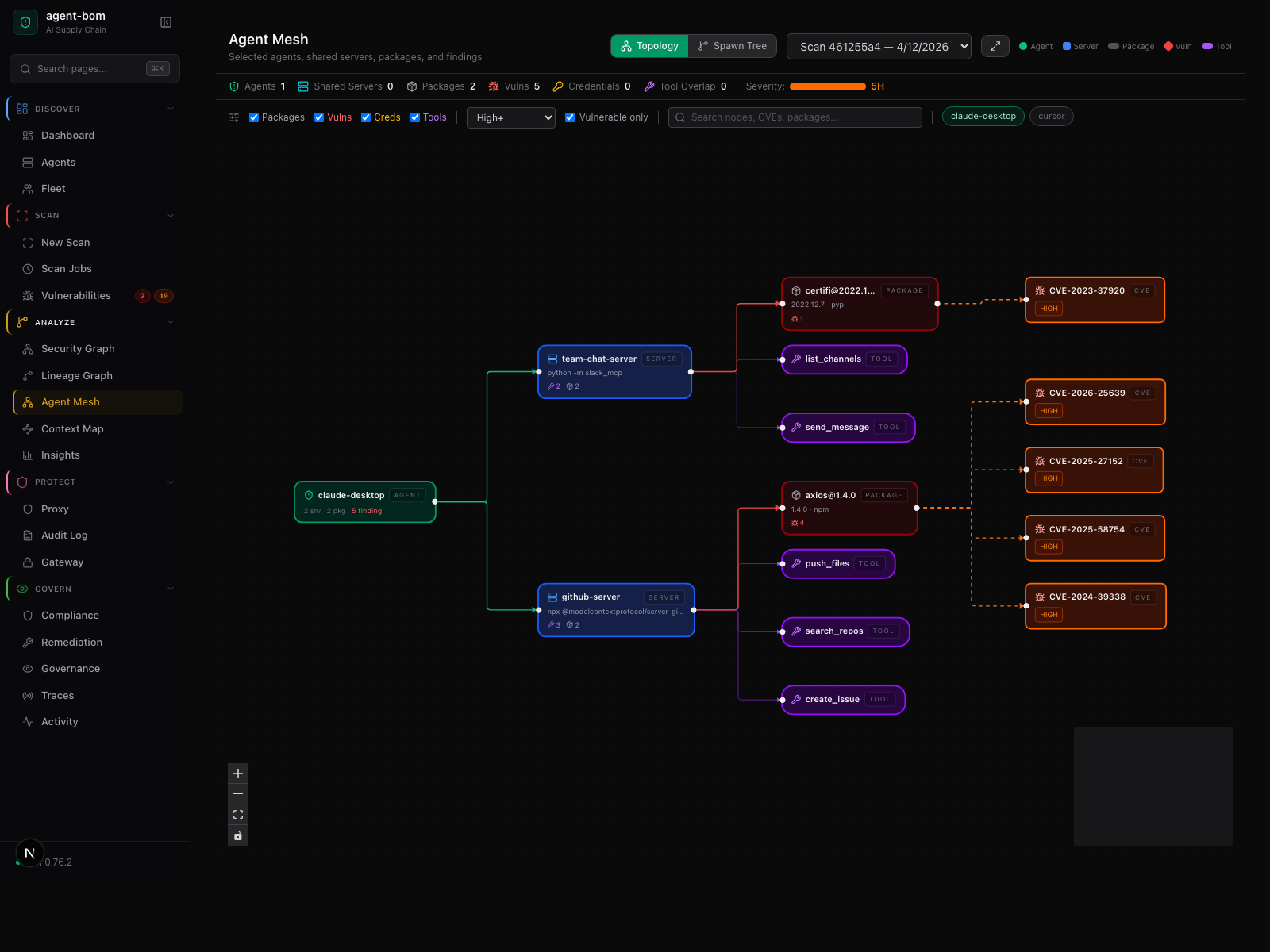
Agent-centered shared-infrastructure graph — selected agents, their shared MCP servers, tools, packages, and findings.
How a scan moves through the system — five stages, no source code or credentials leave your machine

Inside the engine: parsers, taint, call graph, blast-radius scoring. External calls are limited to package metadata, version lookups, and CVE enrichment.
agent-bom runs inside your infrastructure: your VPC, your EKS cluster, your Postgres, your SSO, your KMS. No hosted control plane. No mandatory vendor backend. No mandatory telemetry.
The recommended motion is simple:
- start with inventory using scans and fleet sync
- prove findings, graph, and blast radius
- add runtime later with proxy or gateway only where enforcement is worth it
That keeps the day-1 path easy while still giving you a full runtime story later.
Two diagrams explain the self-hosted shape without collapsing into one overloaded chart:
%%{init: {"theme":"base","themeVariables":{"primaryColor":"#0f172a","primaryBorderColor":"#6366f1","primaryTextColor":"#e0e7ff","lineColor":"#64748b"}}}%%
flowchart LR
    classDef ctrl fill:#0f172a,stroke:#6366f1,color:#e0e7ff
    classDef data fill:#0f172a,stroke:#f59e0b,color:#fef3c7
    classDef edge fill:#0f172a,stroke:#38bdf8,color:#e0f2fe

    Scan["Scans + Fleet"]:::data --> API["API + UI + Postgres"]:::ctrl
    API --> Graph["Findings + Graph + Audit"]:::data
    API --> Gateway["Optional Gateway"]:::edge
    API --> Proxy["Optional Proxy"]:::edge
Deployment truth:
- the browser UI drives workflows
- the API owns auth, RBAC, tenant scope, graph, audit, and policy
- workers do scans and ingest
- fleet gives inventory without proxy
- proxy and gateway are peer runtime surfaces, not a required serial chain
agentbom/agent-bom= CLI, API, jobs, gateway, proxy, MCP server modeagentbom/agent-bom-ui= browser control-plane UI
Use this split:
| Goal | Recommended path | Default choice |
|---|---|---|
| Fastest pilot | deploy/docker-compose.pilot.yml |
one machine, API + UI |
| Production self-hosted | scripts/deploy/install-eks-reference.sh |
EKS + Postgres |
| Advanced/manual | Helm + your own values layering | only when you intentionally want to diverge |
Runtime choices:
| Need | Use |
|---|---|
| Inventory first | scans + fleet |
| Shared remote MCP traffic | agent-bom gateway serve |
| Workload-local inline enforcement | selected agent-bom proxy sidecars or local wrappers |
| Node-wide runtime coverage | optional monitor only if your platform team explicitly wants a DaemonSet |
Current graph scale boundary:
- the graph is strong for pilot and mid-market investigation flows, but larger tenants should stay windowed by snapshot, page, search, and blast-radius drilldown instead of expecting one giant browser canvas to stay smooth
- operator sizing guidance and the shipped benchmark harness live in Performance, Sizing, and Benchmarks
Backend defaults:
| Layer | Default | Add later only if needed |
|---|---|---|
| control plane | Postgres | Snowflake only when the published backend parity is the reason to choose it |
| analytics / archive | none required | ClickHouse, OTEL, S3 |
| Need | Start here |
|---|---|
| fastest local pilot | Deployment Overview |
| self-host in vanilla AWS / EKS | Vanilla EKS Quickstart |
| self-host with mesh / ESO / cert-manager | Deploy In Your Own AWS / EKS Infrastructure |
| endpoint inventory and laptop rollout | Endpoint Fleet |
| proxy and gateway runtime operations | Runtime Operations |
| trust model, auth, tenant isolation | ENTERPRISE_SECURITY_PLAYBOOK.md |
| procurement security posture | ENTERPRISE_SECURITY_POSTURE.md |
| procurement evidence packet | ENTERPRISE_PROCUREMENT_PACKET.md |
| support, patch, and disclosure model | ENTERPRISE_SUPPORT_MODEL.md |
| SOC 2 / ISO / CIS control mapping | CONTROL_MAPPING.md |
Advanced deployment notes
With scans and fleet sync alone, teams can already see:
- which endpoints have MCP clients or collectors
- which MCP servers are configured
- transport:
stdio,sse, orhttp - declared tools
- command or URL
- credential-backed environment variables
- last seen and last synced state
- package, image, IaC, and related finding context
- configured MCP clients, transports, declared tools, command paths, URLs, auth mode, and credential-backed environment references are high-confidence inventory surfaces
- source-code agent and tool extraction still mixes static parsing and heuristics, so indirect or runtime-only registrations can under-report today
- inventory is a strong operator baseline now, not a claim that every dynamic framework registration path is fully captured already
| Surface | Owns | Does not own |
|---|---|---|
| UI | run-now actions, review, export, policy workflows | direct collection |
| API / control plane | auth, RBAC, tenant scope, orchestration, persistence, graph, audit, policy | inline MCP enforcement |
| Workers | scans, ingest, normalization, imports | browser sessions |
| Fleet | endpoint and collector inventory | runtime blocking |
| Proxy | local inline MCP inspection and audit relay | central policy storage |
| Gateway | shared remote MCP traffic and shared runtime policy evaluation | full control-plane persistence |
- full deployment overview: site-docs/deployment/overview.md
- self-hosted AWS / EKS rollout: site-docs/deployment/own-infra-eks.md
- endpoint inventory and fleet: site-docs/deployment/endpoint-fleet.md
- proxy / gateway / fleet choice guide: site-docs/deployment/proxy-vs-gateway-vs-fleet.md
- runtime operations: site-docs/deployment/runtime-operations.md
- EKS production values: deploy/helm/agent-bom/examples/eks-production-values.yaml
- focused pilot values: deploy/helm/agent-bom/examples/eks-mcp-pilot-values.yaml
- regulated/zero-trust example: deploy/helm/agent-bom/examples/eks-istio-kyverno-values.yaml
- Snowflake example: deploy/helm/agent-bom/examples/eks-snowflake-values.yaml
agent-bom is a single-language stack from CLI through API through MCP server through scanner. The scanner — every ecosystem parser, every CVE matcher, every blast-radius and reachability walker — is pure Python. No Rust toolchain, no Go binaries, no CGo bindings, no platform-specific wheels for the scanner path. pip install agent-bom and you have a working scanner.
What this gets you:
- One language to audit. Security teams reviewing the scanner code don't context-switch between Python, Rust, and Go.
- Reproducible findings. Identical output across macOS, Linux glibc, Linux musl, and Alpine — no native parser version drift.
- Disk-image scans without
syft. Native Debian (dpkg) and RPM (rpm/ SQLite RPM DB) parsers ship in-process; thesyftGo binary is opt-in only as a tar-archive fallback (src/agent_bom/filesystem.py).
What it costs (honest tradeoffs):
- Slower than Rust/Go scanners on huge fanouts. Mitigated by the adaptive backpressure + scanner concurrency knobs (
AGENT_BOM_BACKPRESSURE_*,AGENT_BOM_SCANNER_MAX_CONCURRENT); still real at the high end. - Higher per-package memory than tightly-packed Go structs.
- For VM disk-image scanning at scale,
syftis the practical fallback — opt in by installing thesyftbinary onPATH.
The dashboard UI under ui/ is TypeScript / Next.js / React 19 — that's the only non-Python surface, and it's strictly the operator-facing dashboard, not the scanner.
agent-bom is a read-only scanner. It never writes configs, never executes MCP servers, never stores credential values. No telemetry. No analytics. Releases are Sigstore-signed with SLSA provenance and self-published SBOMs.
| When | What's sent | Where | Opt out |
|---|---|---|---|
| Default CVE lookups | Package names + versions | OSV API | --offline |
| Floating version resolution | Names + requested version | npm / PyPI / Go proxy | --offline |
--enrich |
CVE IDs | NVD, EPSS, CISA KEV | omit --enrich |
--deps-dev |
Package names + versions | deps.dev | omit --deps-dev |
verify |
Package + version | PyPI / npm integrity endpoints | don't run verify |
| Optional integrations | Finding summaries | Slack / Jira / Vanta / Drata | don't pass those flags |
Full trust model: SECURITY_ARCHITECTURE.md · PERMISSIONS.md · Data Access Boundaries · SUPPLY_CHAIN.md · RELEASE_VERIFICATION.md · ENTERPRISE_SECURITY_POSTURE.md · CONTROL_MAPPING.md.
Bundled mappings across 14 tag-mapped frameworks — OWASP LLM/MCP/Agentic Top 10s, MITRE ATLAS, NIST AI RMF, NIST CSF, NIST 800-53, FedRAMP Moderate, EU AI Act, ISO 27001, SOC 2, CIS Controls v8, CMMC 2.0, and PCI DSS — plus an OWASP AISVS benchmark surface. The bundled control set per framework is a curated subset focused on AI/MCP/agent risk, not a full catalog — see docs/ARCHITECTURE.md § Coverage per framework for honest counts. Export tamper-evident evidence packets in one command.

agent-bom agents -p . --compliance-export fedramp -o fedramp-evidence.zip
agent-bom agents -p . --compliance-export nist-ai-rmf -o evidence.zip
The audit log itself is HMAC-chained and exportable as a signed JSON/JSONL bundle at GET /v1/audit/export.
pip install agent-bom                        # CLI
docker run --rm agentbom/agent-bom agents    # Docker
For published containers, the packaging model is:
- one product, two deployable images — the second is optional
agentbom/agent-bom= the main runtime image for CLI, API, jobs, gateway, proxy-related entrypoints, and MCP server mode. The Next.js dashboard is bundled inside the wheel and served from the same process, so single-host pilots only need this image.agentbom/agent-bom-ui= the same Next.js dashboard packaged as its own Node container, for Kubernetes deployments that scale / restrict / ingress the UI tier independently of the API tier.
See docs/ENTERPRISE_DEPLOYMENT.md § Container images — do I need both? for the full split-vs-single-image guidance.
| Mode | Best for |
|---|---|
CLI (agent-bom agents) |
local audit + project scan |
Endpoint fleet (--push-url …/v1/fleet/sync) |
employee laptops pushing into self-hosted fleet |
GitHub Action (uses: msaad00/agent-bom@v0.84.0) |
CI/CD + SARIF |
Docker (agentbom/agent-bom) |
isolated scans, API jobs, and non-browser self-hosted entrypoints |
Browser UI image (agentbom/agent-bom-ui) |
the dashboard image paired with the same self-hosted control plane |
Kubernetes / Helm (helm install agent-bom deploy/helm/agent-bom) |
self-hosted API + dashboard, scheduled discovery |
REST API (agent-bom api) |
platform integration, self-hosted control plane |
MCP server (agent-bom mcp server) |
Claude Desktop, Claude Code, Cursor, Codex, Windsurf, Cortex |
Runtime proxy (agent-bom proxy) |
MCP traffic enforcement |
Shield SDK (from agent_bom.shield import Shield) |
in-process protection |
Backend choices stay explicit and optional:
SQLitefor local and single-node usePostgres/Supabasefor the primary transactional control planeClickHousefor analytics and event-scale persistenceSnowflakefor warehouse-native governance and selected backend paths
Six ways to run agent-bom — locally, in CI, self-hosted, cloud-read-only, pushed inventory, or through your AI agent — chosen by your security boundary, not ours. agent-bom holds only the credentials your chosen mode requires and reaches only the systems your chosen mode permits. The discovery skills work standalone too: use them for inventory, and route to agent-bom only when you want findings, graph, policy, or exports.
References: PRODUCT_BRIEF.md · PRODUCT_METRICS.md · ENTERPRISE.md · How agent-bom works.
CI/CD in 60 seconds
- uses: msaad00/agent-bom@v0.84.0
  with:
    scan-type: scan
    severity-threshold: high
    upload-sarif: true
    enrich: true
    fail-on-kev: true
Container image gate, IaC gate, air-gapped CI, MCP scan, and the SARIF / SBOM examples are documented in site-docs/getting-started/quickstart.md.
36 read-only security tools, 6 resources, and 6 workflow prompts available inside any MCP-compatible AI assistant:
{
  "mcpServers": {
    "agent-bom": {
      "command": "uvx",
      "args": ["agent-bom", "mcp", "server"]
    }
  }
}
Marketplace and agentic surfaces: Glama, OpenClaw skills, the Smithery manifest, and the MCP Registry manifest.
Install extras + output formats
| Extra | Command |
|---|---|
| Cloud providers | pip install 'agent-bom[cloud]' |
| MCP server | pip install 'agent-bom[mcp-server]' |
| REST API | pip install 'agent-bom[api]' |
| Dashboard | pip install 'agent-bom[ui]' |
| SAML SSO | pip install 'agent-bom[saml]' |
JSON · SARIF · CycloneDX 1.6 (with ML BOM) · SPDX 3.0 · HTML · Graph JSON · Graph HTML · GraphML · Neo4j Cypher · JUnit XML · CSV · Markdown · Mermaid · SVG · Prometheus · Badge · Attack Flow · plain text. OCSF is used for runtime / SIEM event delivery, not as a general report format.
git clone https://github.com/msaad00/agent-bom.git && cd agent-bom
pip install -e ".[dev-all]"
pytest && ruff check src/
CONTRIBUTING.md · docs/CLI_DEBUG_GUIDE.md · SECURITY.md · CODE_OF_CONDUCT.md
Apache 2.0 — LICENSE